Rocketspin Mobile Experience: App Status and Browser Use
 Available in US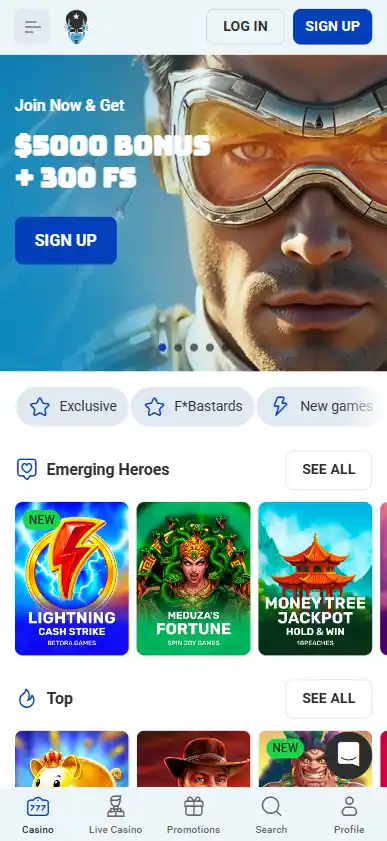
Rocketspin is verified as usable through a mobile browser, but a dedicated native Rocketspin app for iOS or Android is not currently verified. That distinction matters because Rocketspin itself uses a “Download App” label while its official installation page tells Android and iPhone users to add the website to the home screen from the browser. Those steps describe a web-app or PWA-style installation, not evidence of a separately published native App Store or Google Play application.
For Australian readers, this page is an interface and verification guide rather than an access guide. It does not provide download links, login steps, mirror domains, VPN instructions or methods for bypassing website blocking. The practical focus is what the current mobile evidence proves: responsive browser presentation, home-screen web-app behaviour, familiar game and account sections, and no verified native-store listing.
Table of Contents
- Mobile browser, PWA and native app are different things
- What Rocketspin’s own “Download App” page shows
- What is verified about the mobile browser experience
- Payments on mobile use the same underlying cashier evidence
- Native App Store and Google Play status
- Why a PWA-style experience can look like an app
- Mobile usability by function
- Australian readers should separate mobile capability from access status
- How to evaluate future app claims
- Sources and date checked
- Summary
- Recommend
Mobile browser, PWA and native app are different things
The phrase “casino app” is often used loosely, but there are three different delivery models worth separating. A mobile website runs in a browser. A progressive web app, or PWA-style experience, can be added to a home screen while still being based on web technology. A native app is distributed as an application package through a platform such as Apple’s App Store or Google Play, normally under an identifiable publisher listing.
| Mobile format | Current evidence | What can be claimed |
|---|---|---|
| Mobile browser | Verified across the brand site and supporting sources | Rocketspin presents a mobile browser experience |
| Web app / PWA-style home-screen install | Official install page tells users to use browser “Add to Home Screen” functions | The “Download App” label can refer to a web-app style installation |
| Native iOS app | No verified dedicated Rocketspin App Store listing found as of 10 September 2026 | Do not claim a verified native iOS app |
| Native Android app | No verified dedicated Rocketspin Google Play listing found as of 10 September 2026 | Do not claim a verified native Android app |
This distinction prevents a common factual mistake. A page can display “Download App” without proving that an operator has a native store application. The installation mechanism is the stronger evidence. Rocketspin’s official page describes browser menu and home-screen actions, which is consistent with a web-app approach.
What Rocketspin’s own “Download App” page shows
Rocketspin currently maintains an official page headed “Download App” and “Rocket Spin Mobile App”. The wording alone could be read as a native-app claim, but the actual instructions are more specific. On Android, the page describes using the browser menu and adding the site to the home screen. On iPhone, it describes the Safari share menu and the same home-screen action.
For accuracy, the implementation matters more than the headline. Those instructions describe installing or pinning a web experience from the browser. They do not establish a separately distributed iOS binary or Android application package from an official store listing. This page therefore uses “web app” or “PWA-style” for that behaviour and reserves “native app” for a verified store application.
Mobile interfaces can change, so the useful evidence is the current Rocketspin mobile presentation rather than a reconstructed or assumed native-app layout.
What is verified about the mobile browser experience
Current evidence confirms mobile-browser availability and the current site exposes the same broad casino and live-casino navigation families seen on desktop. The game catalogue includes slots, jackpots, bonus buy, Megaways, instant-win content and live casino, with live categories including blackjack, roulette, baccarat, poker, game shows and other live games.
That does not mean every title is available in every location. The dedicated games and pokies handles provider and country restrictions, while live casino covers the live category in more detail. The mobile page only needs to establish that the interface exposes these categories in a mobile-friendly web environment.
A mobile browser also keeps account, payments, support and navigation functions within the same site framework rather than requiring a separate native software product. From a verification perspective, that is useful because the mobile experience can be compared directly with the current web source instead of relying on an app-store description that has not been verified.
Payments on mobile use the same underlying cashier evidence
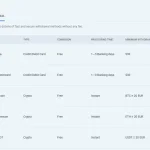
The current AU payments page shows Visa, Mastercard, CashToCode, Bitcoin, Ethereum, USDT, Dogecoin, Litecoin and Bitcoin Cash on the Australia-facing deposit table. Seeing those functions on a mobile layout does not create a separate mobile payment product or change the underlying terms.
For that reason, this page does not repeat minimums, withdrawal speeds or fee tables. The mobile payment context is covered in the main payments guide, and the separate withdrawal page handles payout timing and limits. A responsive screen can make the cashier easier to view on a phone, but it does not override method availability, bank decisions, KYC or processing rules.
Native App Store and Google Play status
Two independent sources support the conclusion that Rocketspin does not have a dedicated native iOS or Android app, and checks on 10 September 2026 did not locate a verified Rocketspin publisher listing in Apple’s App Store or Google Play. The official Rocketspin installation flow continues to point to a browser-based home-screen setup.
Absence claims need careful wording because store listings can change. The appropriate statement is therefore current and scoped: no dedicated native Rocketspin iOS or Android app is verified as of 10 September 2026. If a future official store listing appears under a verifiable Rocketspin or operator publisher identity, this page should be updated rather than preserving the older conclusion.
The same rule protects against lookalike applications. A casino-like name, generic rocket icon or unrelated gambling app is not enough. A native-app claim should be tied to an official store listing and a publisher relationship that can be verified, not inferred from naming alone.
Why a PWA-style experience can look like an app
A home-screen web app can create an app-like icon and open into a compact browser-driven interface. To a user, that can feel close to a native app even though the distribution and technology are different. This is why casual reviews sometimes describe a PWA as an Android or iPhone app without checking how it was installed.
The terminology should follow the delivery model rather than appearance. If the experience is added from Chrome or Safari through the browser’s home-screen function, it is treated as web-app or PWA-style behaviour. If it comes from an official App Store or Google Play publisher listing, it can be described as native. Rocketspin currently fits the first category based on the official installation instructions.
Mobile usability by function
- Navigation
- The current mobile site exposes the core casino, live casino, promotions and account-oriented navigation in a responsive web layout.
- Games
- The same broad game families are presented through the mobile web interface, although individual provider and territory restrictions remain separate facts.
- Live casino
- Live game categories are visible in the site structure, but mobile performance can still depend on device, browser, connection quality and the game provider’s own delivery.
- Payments
- The AU cashier methods are part of the web platform. A mobile viewport does not change the factual payment terms described on the payment pages.
- Account and verification
- Account functions appear within the browser experience, while detailed KYC requirements belong to the dedicated account verification page.
These points describe the interface at a functional level. They are intentionally not installation or access instructions.
Australian readers should separate mobile capability from access status
A site being technically responsive on a phone does not establish that it is Australian-licensed, ACMA-approved or protected by Australian local casino regulation. Mobile capability and regulatory status are different dimensions. The same applies to a home-screen web app: an installable web interface is not evidence of local authorisation.
The dedicated Australian regulatory context page handles that question. This mobile article stays factual and non-promotional and does not provide mirror-domain, VPN, sideloading or block-circumvention guidance.
That boundary is particularly important because users often arrive looking for a download. The purpose here is to verify what kind of mobile product exists, not to help a reader reach or install a gambling service where access may be restricted.
How to evaluate future app claims
- Check whether the claim points to an official Apple App Store or Google Play listing.
- Verify the publisher identity rather than relying only on the app name or icon.
- Distinguish a browser “Add to Home Screen” flow from a native-store download.
- Use a current mobile view because the navigation and install messaging can change.
- Do not infer native-app status from the words “Download App” alone.
- Keep game, payment and regulatory claims tied to their own evidence rather than treating mobile availability as proof of them.
This approach gives a more durable answer to the question “Does Rocketspin have an app?” than repeating a marketing label without checking the delivery model.
Sources and date checked
Rocketspin’s current official install-app page was checked on 10 September 2026. It uses “Download App” wording but provides Android and iPhone instructions based on browser home-screen functions. The current Rocketspin web surface was also checked for responsive mobile-oriented navigation. Apple App Store and Google Play searches were rechecked on 10 September 2026 and did not produce a verified dedicated Rocketspin native listing.
Summary
Rocketspin has a verified mobile-browser experience and an official “Download App” page, but the implementation shown on that page is browser-based home-screen installation. That is best described as a web-app or PWA-style experience. A dedicated native iOS or Android app is not currently verified.
The distinction matters because native-app claims should be supported by an official store listing, not by an app-like icon or generic download wording. For Australian readers, this page remains a verification resource rather than an access route: no download links, login instructions, mirror domains or blocking workarounds are provided. For the wider brand context, use the Rocketspin Australia guide.